Crumbly Comfort: A Practical Font for Real Creative Workflows
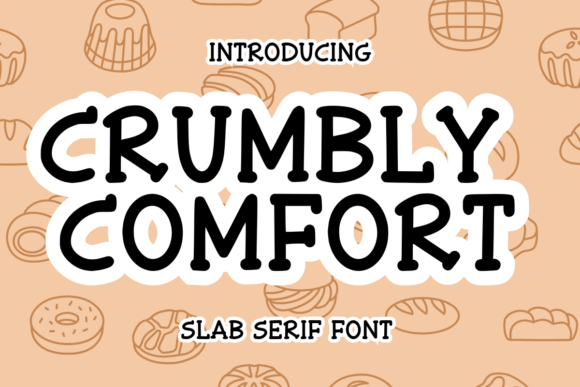
Crumbly Comfort is a playful sans serif font designed not just to look good—but to function well across the full arc of a creative or business project. It’s not a decorative afterthought. It’s a tool that supports clarity, consistency, and personality at every stage: from early ideation and client briefs to final print-ready files and digital mockups. Whether you’re drafting a planner layout in Canva, setting type for a KDP interior, or prepping a tumbler wrap for your Etsy shop, Crumbly Comfort fits into your process—not as a standalone flourish, but as a reliable, adaptable asset.
Where Crumbly Comfort Fits in Your Workflow
Fonts are rarely chosen in isolation. They’re selected in context—against a brand palette, alongside imagery, within layout constraints, and under technical requirements. Crumbly Comfort excels because it bridges functional needs and expressive intent without friction. Before you begin a project, it helps set tone and audience alignment: a playful yet legible sans serif signals approachability and warmth—ideal for journals, greeting cards, or educational handouts aimed at adults who value both substance and charm. During execution, its clean letterforms scale predictably across sizes, making it easy to maintain hierarchy in planners or mini calendars without reworking spacing or weight contrast. After export, its broad file compatibility (OTF, TTF, WOFF) ensures consistent rendering whether embedded in a PDF planner, rendered on a Shopify product page, or layered into a Procreate scrapbook template.
Use Cases That Reflect Real Work Patterns
Crumbly Comfort isn’t limited to seasonal themes—it’s built for repetition, iteration, and reuse. Consider how it functions across common creator tasks:
- KDP interiors: Its open counters and generous x-height improve readability in small-point text—critical for lined journal pages or guided reflection prompts where users write by hand. Pair it with a neutral serif for body copy and keep Crumbly Comfort for headings, section dividers, and interactive elements like checkboxes or habit trackers.
- Planner and calendar design: Because Crumbly Comfort includes stylistic alternates and ligatures, you can subtly vary emphasis—e.g., using a swash “Q” for quarterly review headers or a bolder “A” for “Action” sections—without switching fonts. This maintains visual cohesion while adding rhythm.
- Laser-cut crafts and tumbler wraps: Vector-based outlines render cleanly at any size. When prepping SVG files for Cricut or Silhouette, Crumbly Comfort’s simplified shapes minimize node complexity—reducing cutting errors and speeding up test runs.
- Tarot or zodiac-themed assets: Its friendly geometry avoids occult clichés while still feeling intentional—use it for card titles, guidebook sidebars, or printable altar labels where spiritual tone meets modern usability.
Integration With Tools You Already Use
Crumbly Comfort works quietly inside your existing stack. In Adobe Illustrator or Affinity Designer, install it once and access OpenType features—like contextual alternates—via the Glyphs panel to fine-tune spacing around punctuation-heavy phrases (“Happy Halloween!” or “✨ Scorpio Season ✨”). In Canva, upload the TTF file to Brand Kit to apply consistently across templates—especially helpful if you manage multiple planner lines or seasonal product bundles. For educators building printable classroom resources, use Crumbly Comfort in Google Slides for editable slide decks, then export as PDFs with embedded fonts to preserve fidelity when students download or print.
It also pairs effectively with complementary assets. Use it alongside seamless pattern brushes (e.g., subtle leaf motifs for fall planners) or minimalist line icons—its rounded terminals echo organic shapes without competing for attention. When building t-shirt mockups in Placeit or Smartmockups, apply Crumbly Comfort to quote-based designs first, then adjust kerning manually to match fabric texture preview; the font’s even stroke weight holds up better than high-contrast serifs under simulated print distortion.
Practical Tips for Consistent, Efficient Use
Adopting any new font requires intention—not just installation. Here’s how to integrate Crumbly Comfort without disrupting momentum:
- Start with one anchor use case. Don’t try to replace all heading fonts at once. Pick a recurring deliverable—like weekly newsletter headers or KDP cover subtitles—and standardize Crumbly Comfort there first. Measure time saved on formatting decisions over two weeks.
- Create a style reference sheet. Export a single-page PDF showing Crumbly Comfort at 12pt, 18pt, and 36pt with recommended line heights (1.4 for body, 1.2 for headings), paired color hex codes, and safe minimum sizes for print (10pt for body, 14pt for subheads). Keep this open during design sprints.
- Pre-test for accessibility. Run text blocks through a contrast checker (e.g., WebAIM Contrast Checker). Crumbly Comfort performs well against light neutrals and muted pastels—but avoid pairing it with low-saturation grays on white. Stick to tested combos: #2D2D2D on #FFFFFF, or #5E4B3C on #F9F5F0.
- Batch-export variants. If you regularly produce themed products (e.g., Christmas + Halloween + Thanksgiving planners), generate and save preset character sets—like holiday-specific glyphs or alternate numerals—as separate .txt files. Paste them directly into design tools instead of hunting through glyph panels each time.
Long-Term Usability and Quality Control
Crumbly Comfort supports sustainability in creative work—not environmentally, but operationally. Its versatility reduces the need to license or manage dozens of niche fonts. One well-chosen typeface, used intentionally, lowers cognitive load during layout phases and speeds up client revisions. When updating a product line—say, shifting from “Fall Journal Bundle” to “Winter Reflection Kit”—you retain typographic continuity, reinforcing brand recognition without redesigning from scratch.
For publishers and educators, this consistency matters in learning retention: students navigating a series of printable worksheets notice familiar typography before content, creating subconscious scaffolding. For entrepreneurs selling digital downloads, uniform use of Crumbly Comfort across product thumbnails, sales pages, and preview PDFs builds perceived professionalism—even when assets are self-produced.
Finally, consider version control. If you update Crumbly Comfort (e.g., moving from v1.2 to v2.0 with expanded language support), rename the font file clearly and document changes in your asset log. That way, older projects remain stable, and new ones benefit from improvements—like enhanced diacritic spacing for bilingual tarot guides or better kerning for stacked emoji + text combinations (e.g., “🎃 Spooky Notes”).
Moving From Selection to Seamless Execution
Choosing Crumbly Comfort isn’t about chasing trendiness—it’s about selecting a tool that aligns with how you actually work: iteratively, across platforms, under deadlines, and with real constraints. It doesn’t demand special training or plugins. It asks only that you apply it deliberately: matching weight to purpose, testing legibility early, and reusing smartly. Whether you’re sketching ideas on paper, building a Notion dashboard for client projects, or preparing a laser-cut craft kit for resale, Crumbly Comfort stays usable, recognizable, and quietly effective. That’s not just design—it’s workflow integrity.