Project Plan Log Book KDP Interior
If you're building a low-content or no-content publishing business on Amazon KDP, time spent formatting interiors is time not spent scaling your catalog. The Project Plan Log Book KDP Interior solves a very real bottleneck: creating clean, professional, KDP-compliant interiors that convert — without design expertise or hours in layout software. It’s not just another printable PDF; it’s a production-ready, vector-based interior template built specifically for planners, trackers, and project-focused journals — tested and verified on Amazon’s platform.
Why This Interior Stands Out for KDP Publishers
Most low-content interiors rely on raster images or fixed-size layouts, which break when resized or fail KDP’s print quality checks. The Project Plan Log Book KDP Interior uses 100% vector assets (EPS and scalable PDF), meaning every line, grid, and margin remains razor-sharp at any scale. That’s critical when you’re adjusting trim sizes across multiple listings — say, moving from 6×9 to 5×8 — without reworking the entire file. Because it’s built with Adobe Illustrator compatibility in mind, you can open, edit, and repurpose elements directly: change fonts, adjust spacing between sections, or swap icons without pixelation.
It includes three page-count options — 100, 110, and 120 pages — so you’re not forced into arbitrary lengths. Need room for weekly reflections, milestone checklists, and resource trackers? Choose 120. Launching a lean, focused planner for agile teams? 100 pages gives tight structure without bloat. All versions use a standard 6×9 inch trim size, 300 DPI resolution, and no bleed — aligning precisely with KDP’s most common paperback requirements. No guesswork. No last-minute rejection emails.
Real-World Use Cases That Save Time and Reduce Risk
Consider a freelance project manager launching a side hustle selling productivity tools. Instead of commissioning custom design work ($200–$500 per interior) or wrestling with Canva templates that don’t export print-ready PDFs, they download the Project Plan Log Book KDP Interior, rename headers, update the cover, and upload — all in under 90 minutes. The included transparent PNG and high-res JPG files let them generate compelling Amazon A+ content or social media previews instantly.
For educators or course creators bundling physical workbooks with digital offerings, this interior supports structured learning pathways: timeline grids for curriculum mapping, reflection prompts after each module, and space for student notes. Because the layout is modular — with clearly defined sections for goals, deadlines, resources, and outcomes — it adapts naturally to academic, corporate training, or personal development contexts.
Small business owners tracking product launches, marketing campaigns, or client onboarding can repurpose the same interior across multiple niches. Swap “Sprint Review” for “Client Feedback Loop”, adjust column headers in the progress tracker, and reuse the same proven layout. Consistency builds brand recognition; flexibility prevents creative fatigue.
What You Get — and Why Each File Type Matters
- Print-ready PDF (KDP-tested): No preflight surprises. Upload and publish knowing margins, font embedding, and color profiles meet KDP standards.
- Editable EPS source files: Modify colors, add logos, adjust line weights — all while preserving vector fidelity.
- Transparent-background PNGs: Ideal for mockups, ads, or overlaying on lifestyle photos without white boxes.
- Bonus high-resolution JPGs: Ready for Amazon’s interior preview thumbnails, Pinterest pins, or email newsletter visuals.
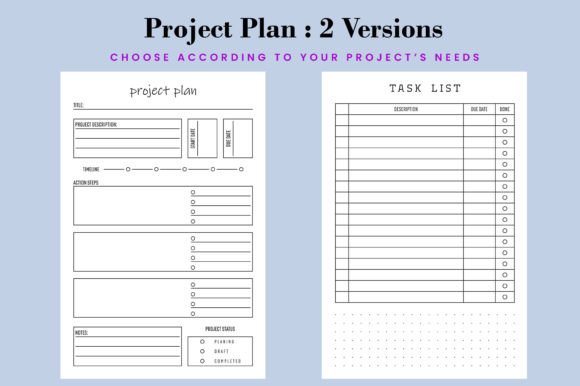
This isn’t a one-size-fits-all filler. It’s a toolkit. The dual-version support (Versions 2) means you can maintain consistency across updated editions — say, adding new quarterly planning spreads — without rebuilding from scratch.
Who Benefits Most — and When to Look Elsewhere
The Project Plan Log Book KDP Interior delivers strongest value for creators who already understand KDP’s workflow but want to eliminate repetitive design tasks. If you’re publishing 5+ low-content titles per month, the time saved on interior prep compounds quickly — easily reclaiming 10–15 hours monthly. Freelancers, solopreneurs, and micro-publishing studios find it especially useful because it scales with their capacity: one purchase supports dozens of listings with minor tweaks.
That said, it’s not ideal if you need highly specialized layouts — like bilingual side-by-side text, complex infographics, or interactive elements (which KDP doesn’t support anyway). Nor does it include copyright-free stock illustrations or licensed fonts; those remain your responsibility. And while the vector foundation allows resizing, switching to unusual trim sizes (e.g., 8.5×11) requires manual margin recalibration — something Adobe Illustrator handles well, but beginners may need light guidance to master.
Practical Tips for Getting Started
Start simple: pick the 100-page version, open the PDF in Acrobat or Illustrator, and replace placeholder text with your branding voice. Change the header font to match your cover — consistency builds trust. Use the transparent PNGs to create realistic flat-lay photos for your Amazon listing. Then test-upload to KDP’s previewer *before* publishing: verify gutter spacing, page numbering, and grayscale rendering (especially if using subtle gray lines).
Once live, track which variations perform best. Does “Project Planner” outsell “Task Tracker”? Do customers leave reviews mentioning the timeline grid? That feedback informs your next iteration — and because the Project Plan Log Book KDP Interior supports quick edits, you can release Version 2 with refined sections in days, not weeks.
In a market where speed, reliability, and polish separate profitable publishers from stalled ones, this interior removes friction without sacrificing control. It’s not magic — it’s leverage. And for anyone serious about growing a sustainable KDP business around project-focused tools, it’s a practical, field-tested foundation worth building on.